
Critical Asset Management System (CAMS) in Brisbane
Is your business aligned with Australia’s Essential Eight cybersecurity framework with Critical Asset Management System (CAMS) in place?
CAMS helps businesses improve their cybersecurity and align with the Australian Government’s Essential Eight (Essential 8) framework. This framework provides a set of practical steps to help protect organisations from common cyber threats.
Security from $16.00 per device per month
What is the Essential 8?
According to the Australian Signals Directorate (ASD), the Essential Eight is a set of prioritised cybersecurity mitigation strategies developed by the Australian Signals Directorate (ASD) to help organisations protect against cyber threats, particularly on internet-connected IT networks.
It is supported by a maturity model that guides organisations in implementing these controls based on real-world cyber threat intelligence and incident response experience.
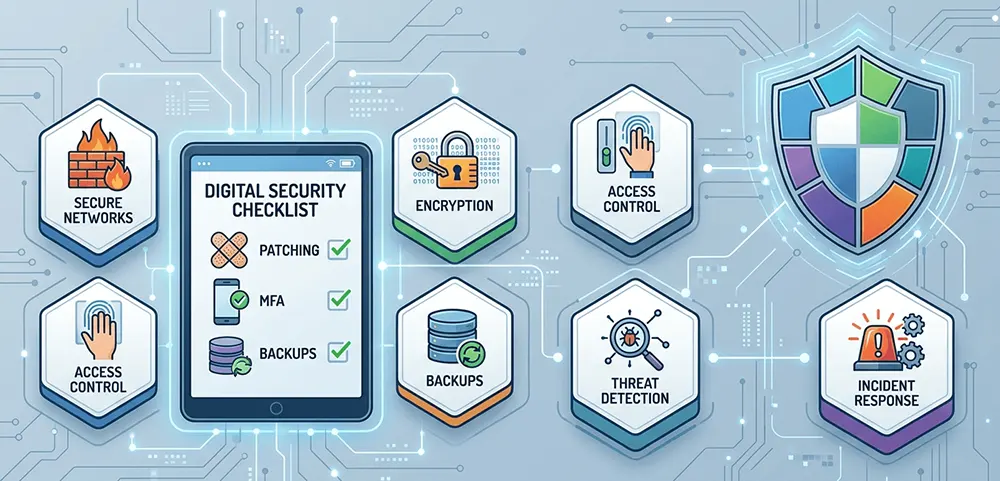
The Essential Eight includes:
- patch applications
- patch operating systems
- multi-factor authentication
- restrict administrative privileges
- application control
- restrict Microsoft Office macros
- user application hardening
- regular backup
As a managed IT service provider in Brisbane offering Critical Asset Management System (CAMS) in Brisbane, Ring IT helps organisations implement and maintain these Essential 8 controls through continuous monitoring, regular patching, and proactive security management.
CAMS (Critical Asset Management System) is the foundation of proactive IT support for Brisbane companies. It monitors your servers, network, and devices, so you can spot and fix problems early. With no disruption to your team, CAMS maintains the system security, stability, and optimal performance of your environment.
How Much Does CAMS Cost?
CAMS is a scalable, cost-effective solution that grows with your business. Pricing starts from just $16 per device per month and is based on your team size, devices, and required modules—so you only pay for what you need. With a simple monthly model and no hidden fees, CAMS ensures your systems stay secure, monitored, and easy to manage as you scale.
What are the Factors Affecting Cost?
Even CAMS starts at a simple base price, your total cost may vary depending on:
- Customisation: Adding advanced features such as forecasting and risk modelling may affect the overall cost.
- Scale: Pricing adjusts based on the number of users, devices, and modules you need.
- Implementation: More complex configurations or integrations can lead to higher initial setup costs.

What CAMS Provides
1. 24/7 Device & Network Monitoring for Brisbane Businesses
Monitor real-time activity across all endpoints, servers, and network devices to keep everything healthy and online.
- Detect errors and performance issues quickly
- It has real-time alerts for critical events
- Early hardware failure detection
- Reduced downtime and faster response
2. Automated Windows / IOS Patching & Updates for Brisbane Companies
Keep your systems secure and up to date automatically, without manual intervention.
Key benefits:
- Automated operating system and software patching
- Scheduled update windows
- Reduced security vulnerabilities
- Consistent compliance across all devices
3. Remote Support & Troubleshooting in Brisbane Organisations
Technicians securely access devices and resolve issues quickly without being on-site.
Key benefits:
- Quicker resolution of issues
- Decreased visits by technicians to the site
- A safe remote access that is assured
- Minimal disturbance to users
- Support requests covered up to 15 minutes
4. Performance Efficiency for Brisbane IT Systems
CAMS tools track system health and performance trends to keep devices running smoothly.
Key benefits:
- Monitoring of CPU, memory, and disk consumption
- Proactive chores for optimising and cleanliness
- Finding gadgets that are slow or malfunctioning
- Enhanced productivity of users
5. Security Monitoring & Threat Detection for Brisbane IT Environments
To assist shield your environment from cyber threats, CAMS interfaces with security tools including endpoint detection and response (EDR) and cyber security solutions.
Key benefits:
- Antivirus and endpoint protection monitoring
- Suspicious activity alerts
- Firewall and network security oversight
- Faster response to potential threats
6. Asset & Inventory Management for Brisbane Businesses
See a complete view of all hardware and software assets across your organisation.
Key benefits:
- Automatic device discovery
- Software licence tracking
- Hardware lifecycle visibility
- Accurate reporting for planning and budgeting
7. Automated Maintenance Tasks for Brisbane IT Infrastructure
Automate routine tasks and keep your systems healthy.
Key benefits:
- Disk cleanup and optimisation
- Log management
- Service restarts and health checks
- Reduced manual workload for IT teams


Why Choose CAMS from RingIT for Your Brisbane or Australian Business?
Because IT should just work — and when it doesn’t, you can call us and speak to a real technician straight away. No support tickets. Ever.
At RingIT, we keep things simple, reliable, and cost-effective. No tech jargon. No unnecessary upgrades. Just fast, personal support when you need it.
We act as your outsourced IT department—without the overhead—so you can focus on running your business, not chasing IT issues.
With over 20 years of experience and a proactive approach, we don’t just fix problems—we prevent them.
RingIT – When you just want things to work.
Ring IT CAMS supports small to medium-sized businesses across Brisbane and Australia. Our team monitors, secures, and optimises your IT infrastructure. We support you in the CBD, suburbs, or nationwide.
Ring IT CAMS helps you keep your IT systems safe, efficient, and productive.
Contact us now to learn how our Critical Asset Management System safeguards and optimises your IT environment.
FAQ – Critical Asset Management System (CAMS)
What is a Critical Asset Management System (CAMS)?
A: CAMS is a proactive IT management system that helps businesses monitor and maintain their IT environment. It tracks and maintains servers, networks, and devices in real time, allowing issues to be identified and resolved before they impact operations. This lowers risks and downtime while enhancing system performance, security, and dependability.
How does CAMS reduce IT downtime?
A: CAMS continuously monitors your IT systems and identifies potential issues early. By detecting problems before they escalate, it allows for quick action to prevent outages. Additionally, it provides real-time warnings for important occurrences, allowing for quicker reaction times and minimising disturbance to your company’s operations.
Does CAMS include remote IT support?
A: Yes, CAMS includes secure remote IT support, allowing technicians to access and resolve issues on your devices without needing to be on-site. This makes it possible to troubleshoot issues more quickly, solve them more quickly, and disturb your team’s workflow as little as possible.
Can small businesses use CAMS?
A: Yes, all sorts of enterprises, including small and medium-sized ones, can benefit from CAMS. It provides scalable monitoring, maintenance, and security features that help smaller businesses stay protected and efficient without requiring a large in-house IT team.
What devices can CAMS monitor?
A: CAMS can monitor a wide range of IT assets, including endpoints (such as computers and laptops), servers, network devices, and other critical infrastructure. This provides you with total access into your company’s IT environment, guaranteeing that everything is current, secure, and working properly.